Any links to online stores should be assumed to be affiliates. The company or PR agency provides all or most review samples. They have no control over my content, and I provide my honest opinion.
Tivique LX15 15.6 Inch Laptop Review
Summary
The Tivique LX15 delivers a noticeable step up in everyday performance over ultra-budget laptops, thanks largely to the Ryzen 3 4300U and 16GB of RAM. While the hardware is undeniably dated and the design shows its age, the real-world experience is smooth enough for office work, web browsing and media consumption. At around £330, it represents strong value if you prioritise responsiveness over modern features, and are willing to accept compromises around battery life, charging and multimedia quality.
Overall
80%-
Overall - 80%80%
Pros
Strong everyday performance
16GB RAM as standard
Solid metal chassis
Good value at £330
Full HD IPS display
Cons
No USB-C charging
Dated processor architecture
Basic webcam and speakers
Average battery life
No keyboard backlight
Last year, I reviewed the Acemagic TX15 laptop, which was available for just £290 at the time of writing and was a decent budget laptop that was capable of handling everyday tasks like office work, web browsing, and media streaming.
I have now been sent the Tivique TX15, a brand closely related to Acemagic.
This laptop seems to be a refresh of the laptop I reviewed last year, with the underlying CPU swapped out from the N150 to the 6-year-old AMD Ryzen 3 4300U.
This new laptop costs a bit more than the Acemagic TX15, but it is still very affordable, costing around £330, and the price difference is almost certainly worth it for the improved performance.
| Preview | Product | Rating | Price | |
|---|---|---|---|---|

| Tivique 2026 15.6 Inch Laptop with Ryzen 4300U Processor up... | Buy on Amazon |
Related Reviews
Specification
| Specification | Tivique LX15 2026 | Acemagic TX15 Laptop |
| Display | 15.6″ IPS, 1920×1080, 60Hz, 180° viewing angle | 15.6″ IPS, 1920×1080, 60Hz, 180° viewing angle |
| Processor | AMD Ryzen 3 4300U | Intel Alder Lake-N150 |
| Cores / Threads | 4 Cores / 4 Threads | 4 Cores / 4 Threads |
| Max Turbo Frequency | 3.7Hz | 3.6GHz |
| Graphics | AMD Radeon Vega 5 Integrated | UHD Graphics 730 |
| TDP | 15 W | 6 W |
| Memory | 16GB DDR4 | 16GB DDR4 |
| Storage | 512GB SSD (expandable up to 2TB) | 512GB SSD (expandable up to 2TB) |
| Storage Expansion | MicroSD/TF Card Slot | MicroSD/TF Card Slot |
| Battery Capacity | 5000mAh | 5000mAh |
| Battery Voltage | 7.6V | 7.6V |
| Power Adapter | 40W | 40W |
| Material | CNC-machined alloy metal shell | CNC-machined alloy metal shell |
| Weight | 1.65kg | 1.65kg |
| Dimensions (L x W x H) | 14″ x 8.9″ x 1.6cm | 14″ x 8.9″ x 1.6cm |
| Camera | 1MP webcam | 1MP webcam |
| Speakers | Dual 1.5W speakers | Dual 1.5W speakers |
| Microphone | DMIC microphone | DMIC microphone |
| Wireless Connectivity | Dual-band Wi-Fi 802.11ax, Bluetooth 5.0 | Dual-band Wi-Fi 802.11ac, Bluetooth 5.0 |
| Ports | 3x USB 3.2, 1x HDMI, 1x Type-C, TF card slot, headphone jack, DC jack | 3x USB 3.2, 1x HDMI, 1x Type-C, TF card slot, headphone jack, DC jack |
| Operating System | Windows 11 Home | Windows 11 Home |
| Warranty | 2-year warranty with 24/7 support | 2-year warranty with 24/7 support |
AMD Ryzen 3 4300U vs Intel N150
The inclusion of the AMD Ryzen 3 4300U seems odd at first. This CPU was launched 6 years ago vs 2025 for the Intel N150.
However, considering the increasing prices of computing hardware, it is not as odd as it seems. While it is old, the performance of the AMD Ryzen 3 4300U will logically be far superior to the N150.
CPU architecture and cores
Ryzen 3 4300U is a 4-core, 4-thread part based on AMD’s Zen 2 architecture, built on a 7 nm process. It runs at 2.7 GHz base with boost clocks up to 3.7 GHz, and carries 4 MB of L3 cache. Intel’s N150 is also a 4-core, 4-thread chip, but uses a more efficiency-focused design on a 10 nm node, with much lower base frequency and a performance profile that generally trails the Ryzen part in aggregate benchmarks. Independent comparisons typically show Ryzen 3 4300U delivering noticeably higher overall CPU performance than the N150 in mixed workloads.
Memory support and bandwidth
The Ryzen 3 4300U supports up to 64 GB of RAM, with dual‑channel DDR4‑3200 or LPDDR4x‑4266, providing substantially higher memory bandwidth. That gives it more headroom for heavier multitasking and memory‑sensitive applications. By contrast, N150 platforms are typically limited to a maximum of around 16 GB RAM, often in single‑channel configuration, and with significantly lower bandwidth. For everyday use, this tends to manifest as slower app launches and more hesitation once you start stacking browser tabs or background tasks.
Integrated graphics and media
Ryzen 3 4300U integrates a Radeon Vega 5 GPU with 5 compute units and clock speeds in the mid‑1 GHz range. It is still entry‑level, but it is capable of accelerating the desktop UI smoothly, handling media playback and allowing very light gaming at reduced resolutions and settings. Intel’s N150 includes a newer integrated GPU with similar basic feature support, but with fewer resources and lower maximum frequency, which typically leaves it behind the Vega 5 solution in GPU benchmarks. Both are fine for video streaming and office work; Ryzen’s advantage mainly shows up if you lean on the iGPU for any 3D work or light creative tasks.
Power, thermals and platform positioning
Ryzen 3 4300U is a 15 W part with configurable TDP, giving OEMs some flexibility in tuning for either battery life or sustained performance. The N150 has a much lower nominal TDP around 6 W, which suits fanless or ultra‑thin designs, but constrains peak performance. In practice, that positions N150 systems squarely in the “basic web and office” bracket, while Ryzen 3 4300U machines can stretch to light productivity and content creation without feeling as constrained.
Design and Display
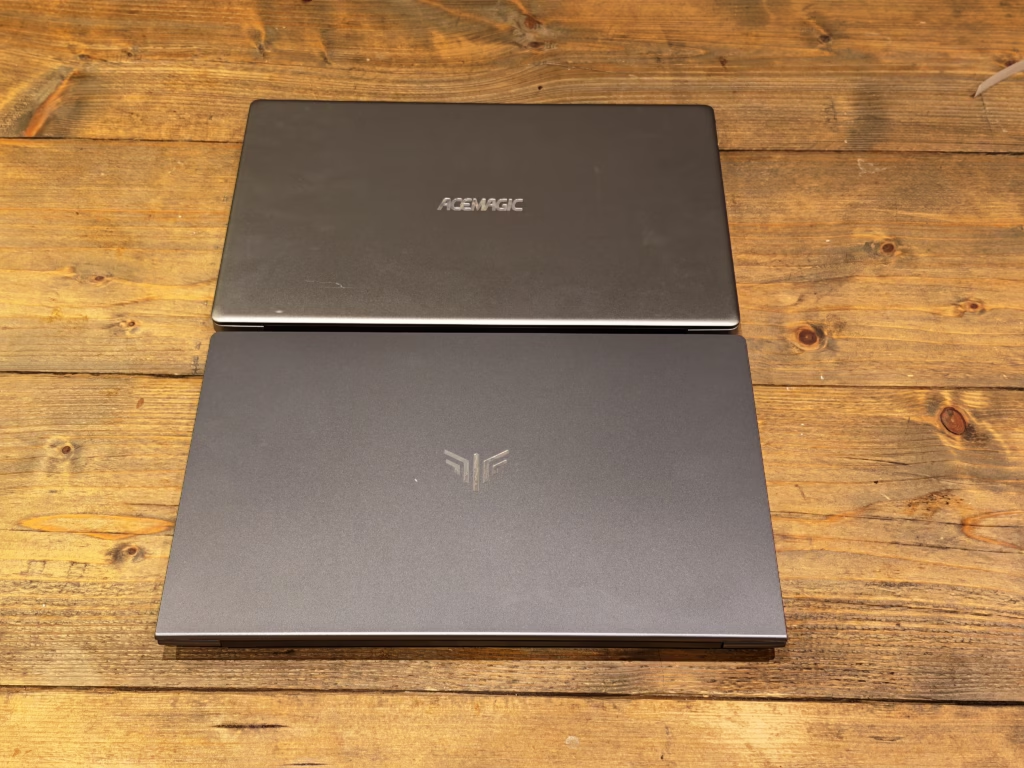
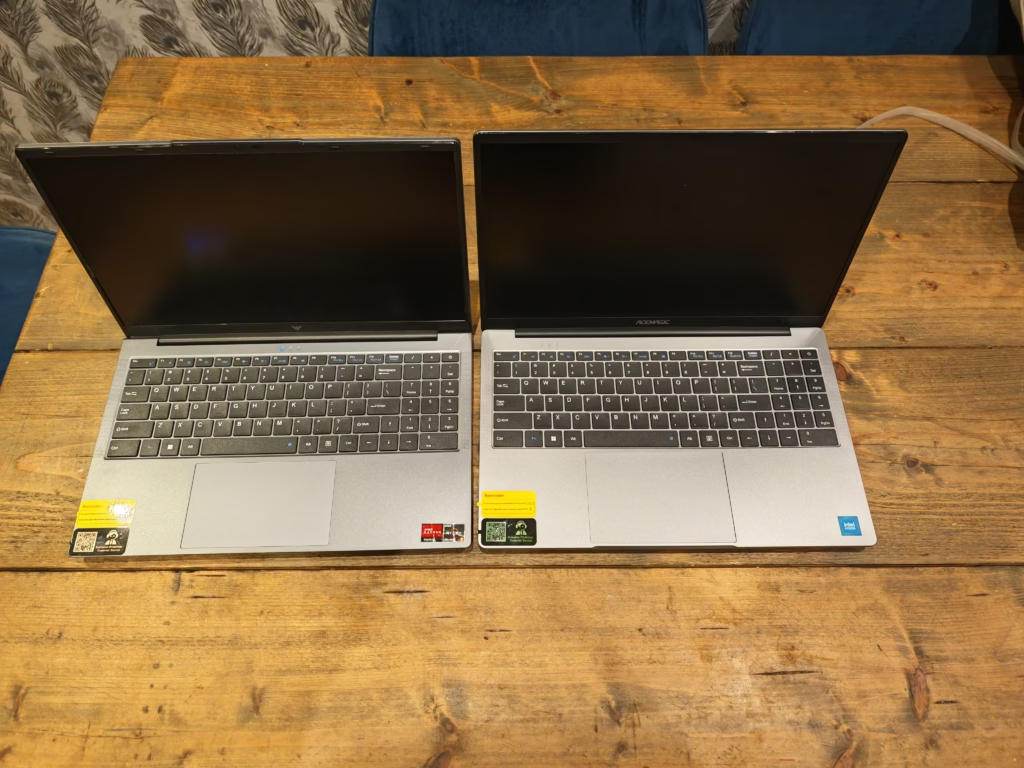
The Tivique LX15 and Acemagic TX15 appear to use an identical chassis, which is not surprising given the close relationship between these brands. The laptop features a CNC-machined alloy metal shell that feels reasonably solid for the price point. At 1.65kg, it’s not the lightest 15.6-inch laptop you can buy, but it’s manageable for occasional travel or moving between rooms at home.
The 15.6-inch IPS display offers a Full HD resolution of 1920×1080 pixels at 60Hz. For a budget laptop in 2026, this remains a sensible choice, providing adequate sharpness for everyday tasks. The IPS panel delivers the promised 180-degree viewing angles, which means you can share the screen with someone sitting beside you without significant colour shift or contrast degradation. In my testing, I found the display perfectly acceptable for typical office work, web browsing, and streaming content from Netflix or YouTube.
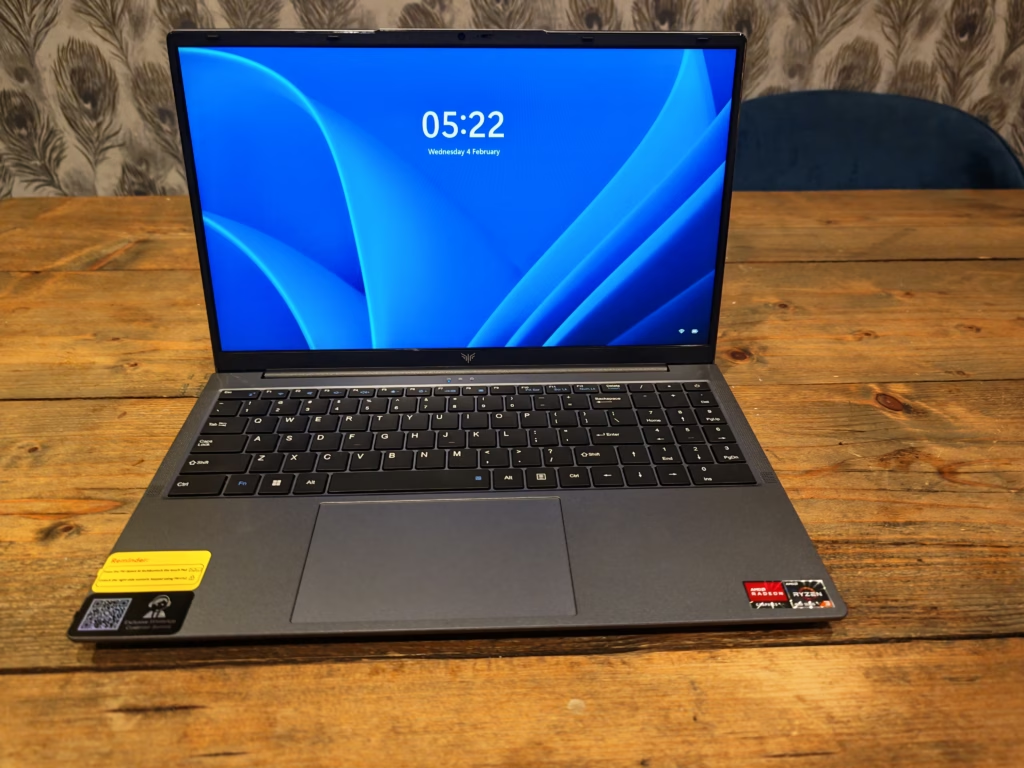
Brightness levels are decent for indoor use, though I’d estimate them to be around 250 nits based on my experience with similar panels. This is sufficient for most scenarios, but you’ll struggle in direct sunlight or particularly bright environments. The anti-glare coating helps somewhat, reducing reflections compared to glossy displays, but it’s not a miracle worker. If you’re planning to use this laptop outdoors frequently, you’ll want to find some shade.
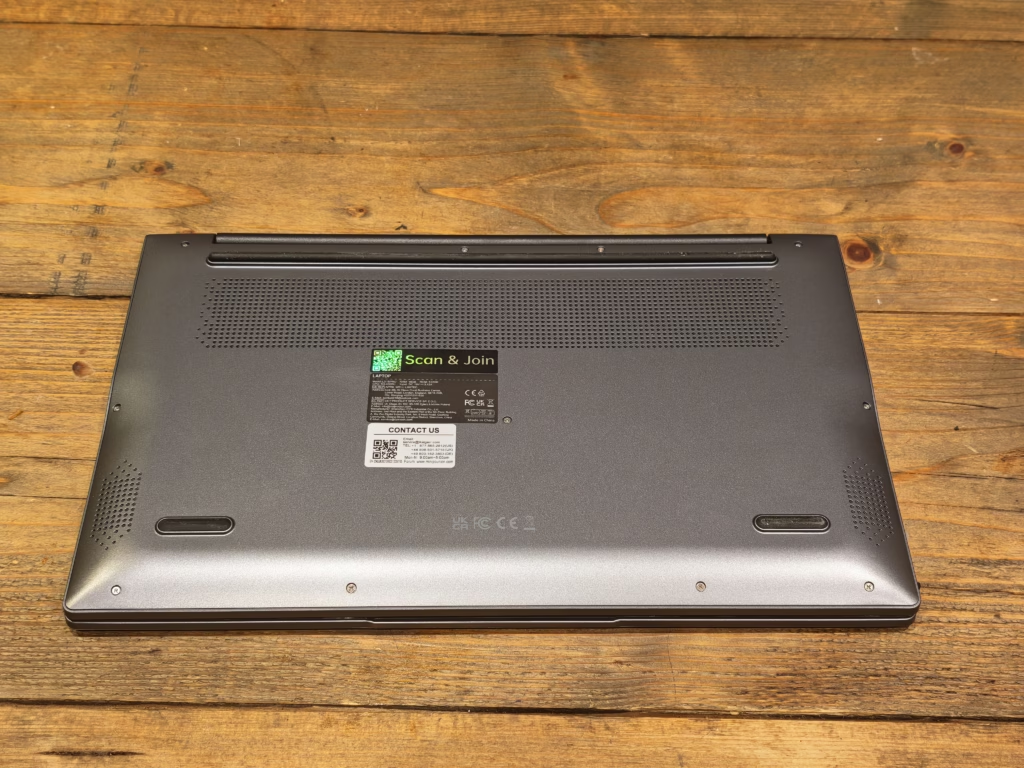
Colour reproduction is acceptable rather than exceptional. This isn’t a display for professional photo editing or colour-critical work, but for consuming media and working with documents, it does the job. The panel doesn’t have the vibrancy or colour accuracy you’d find on more expensive laptops, but that’s to be expected at this price point. For students or office workers, the display meets requirements without any significant compromises.
Ports
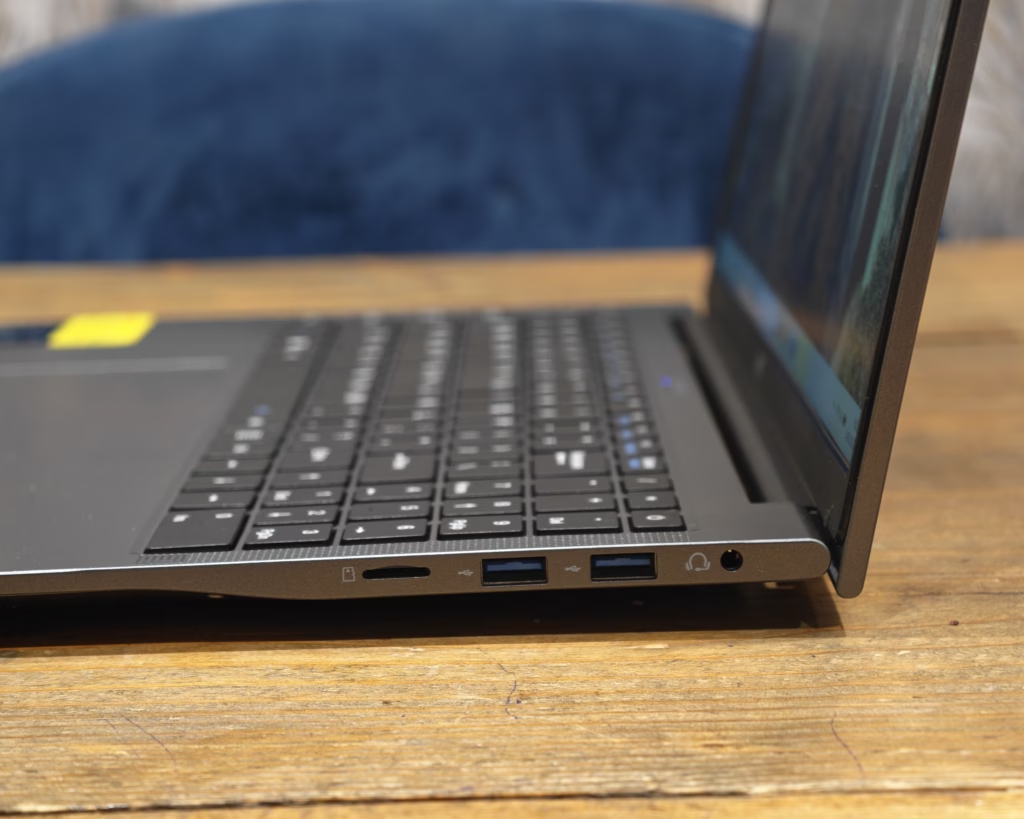
On the left side, you have a DC barrel port, a USB-C port, a USB-A and an HDMI.
Just like the Acemagic, my biggest gripe with this is that it can only be charged via the DC barrel port. The power LED is located next to the USB-C port, so you’d think it would accept USB-C power delivery, but sadly not.
This remains frustrating in 2026, when USB-C charging has become increasingly standard across laptops of all price points. Having to carry around a proprietary power adapter feels antiquated, particularly when many users already have USB-C chargers for their phones, tablets, and other devices. The USB-C port on this laptop is limited to data transfer only, which is a missed opportunity.
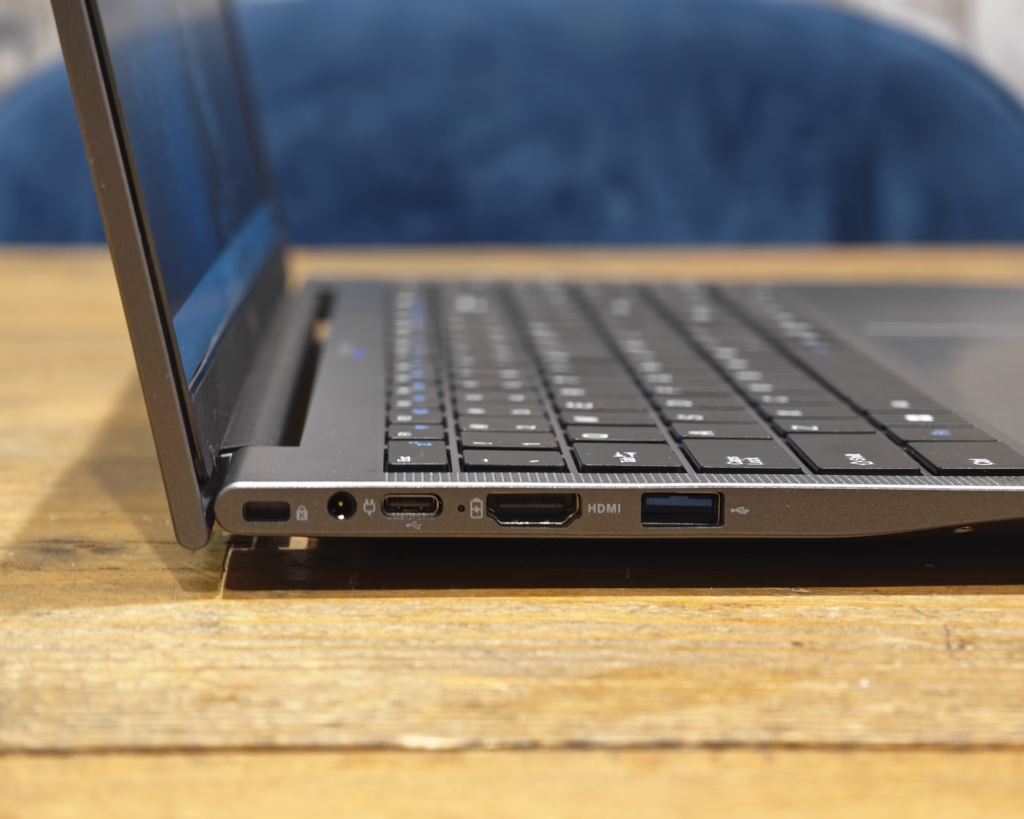
On the right side, you’ll find two additional USB-A ports, a TF card slot, and a 3.5mm headphone jack. The port selection is adequate for most users, with three USB-A ports providing enough connectivity for a mouse, external drive, and other peripherals. The HDMI port supports external displays, which is useful for presentations or connecting to a larger monitor at home.
The inclusion of a TF card slot is welcome for photographers or anyone who needs to transfer files from SD cards, though it would have been preferable to see a full-size SD card slot instead. The positioning of ports is reasonable, though having all the ports on the sides means cables can create clutter on your desk if you’re using multiple peripherals simultaneously.
Keyboard and Trackpad
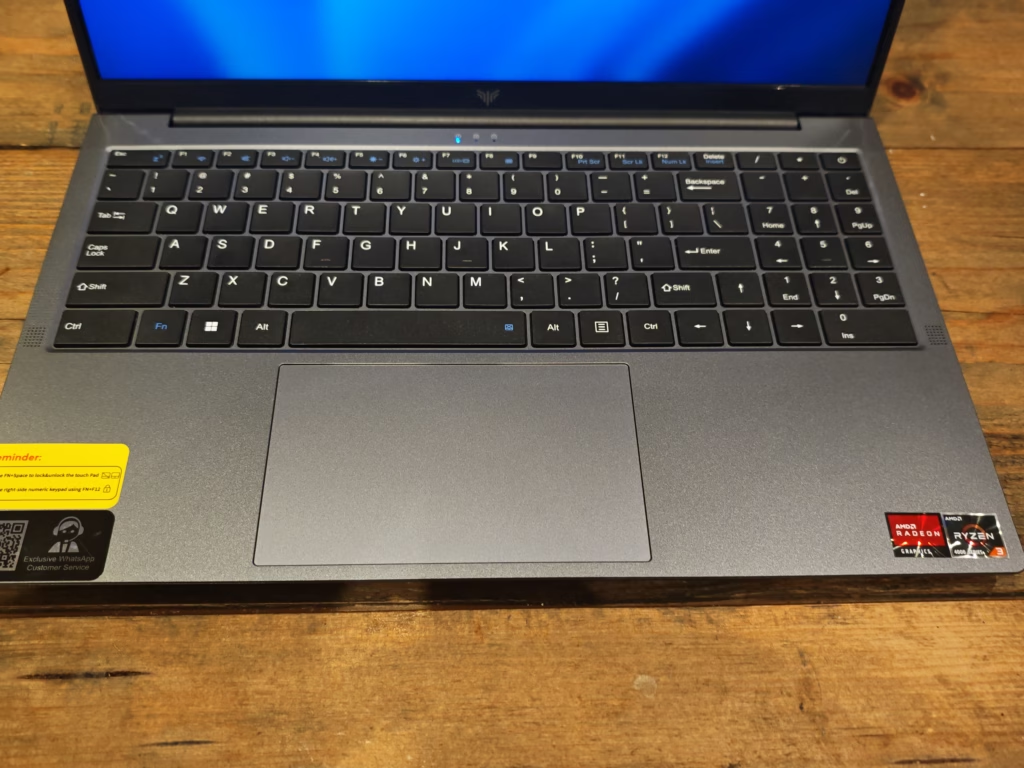
The keyboard experience on the Tivique LX15 mirrors what I found on the Acemagic TX15, which makes sense given they share the same chassis. The keyboard offers decent key travel and tactile feedback, making it suitable for extended typing sessions. I spent several hours working on this review using the laptop’s keyboard, and while it’s not exceptional, it’s perfectly adequate for the price point.
One quirk worth mentioning is that the keyboard has a US layout, and Tivique has included a silicone overlay to convert it to a UK layout. Typing on this overlay is not particularly pleasant – it feels slightly spongy and can interfere with the tactile feedback of the keys underneath. If you’re a touch typist who doesn’t look at the keyboard, you might find it easier to simply remove the overlay and adapt to the US layout. For those who rely on visual cues while typing, the overlay may be a temporary solution until muscle memory develops.
The keys themselves have adequate spacing, and I didn’t experience significant typing errors during my testing. The keys can feel a bit springy, which might not suit everyone’s preference, particularly if you’re accustomed to higher-end keyboards with a firmer response. There’s no keyboard backlight, which is a notable omission for anyone who works in dimly lit environments, though this is fairly standard for budget laptops.
The trackpad is reasonably sized at approximately 130mm wide, providing enough space for comfortable navigation and gesture controls. Multi-touch gestures like pinch-to-zoom and two-finger scrolling work smoothly most of the time. Responsiveness is generally good, though I occasionally noticed slight lag during heavier multitasking scenarios. The trackpad supports the standard Windows gestures, which is useful for quickly switching between apps or accessing different functions.
The trackpad uses a dual-button design rather than a clickable pad, which can feel slightly clunky compared to more modern implementations. The left and right click areas work reliably, but the mechanical buttons produce more noise than I’d prefer. A handy feature is the ability to disable the trackpad entirely via a function key combination, which is useful if you’re using an external mouse and want to avoid accidental cursor movements while typing.
Windows
One concern I had with this laptop was that the old CPU may not be Windows 11 compatible, but Windows supports CPUs going back to the Ryzen 2700 and all the Ryzen 3000 CPUs onwards, so the Ryzen 3 4300U is fully supported.
The out-of-the-box experience is not standard. Windows prompts you to set up a local account rather than the usual online-only account. This may be preferable for most people who value privacy and don’t want their data constantly syncing to Microsoft’s servers, but it shows that Tivique has modified the base OS. I’d personally recommend a fresh Windows installation regardless – this is true for all mini PCs and affordable laptops from these smaller brands. A clean install ensures you’re starting with an unmodified version of Windows without any potential bloatware or customisations that might affect performance or security.
The process of reinstalling Windows is straightforward enough if you have a USB drive and access to another computer to create installation media. For most users who just want to get started quickly, the pre-installed Windows 11 will work fine, but do be aware that it may not be entirely stock.
Day-to-day performance
This is where the Ryzen 3 4300U really justifies the price increase over the Acemagic TX15. For general use, this laptop performs significantly better than its N150-equipped predecessor. I used it for work over several days, running my typical suite of applications including Outlook, Word, Excel, Chrome with multiple tabs, Spotify, and Netflix. The experience was noticeably smoother than the Acemagic, with less hesitation when switching between applications or opening new browser tabs.
The 16GB of RAM helps keep things running smoothly, though you still need to be somewhat mindful of resource management. I found I could comfortably have Outlook open with several Chrome windows containing 10-15 tabs each, plus Spotify running in the background, without experiencing significant slowdowns. However, this isn’t a laptop where you can recklessly open dozens of browser tabs without consequence – you’ll eventually hit the limits of the Ryzen 3 4300U’s processing power.
For office productivity tasks, the laptop handles everything I threw at it competently. Microsoft Office applications run smoothly, with Word and Excel feeling responsive even when working with larger documents or spreadsheets. PowerPoint presentations open quickly and animations play without stuttering. Web browsing through Chrome or Edge is generally fluid, though very heavy websites with lots of JavaScript can occasionally cause brief moments of loading.
Video streaming works well, with Netflix, YouTube, and other services playing 1080p content smoothly. The laptop handles 4K video playback, though you might notice the fan spinning up a bit more audibly. For most people streaming at 1080p, which matches the display resolution anyway, performance is perfectly adequate.
Where the laptop shows its limitations is when you push beyond these basic productivity tasks. Photo editing in applications like GIMP or lightweight versions of Photoshop is possible but can feel sluggish when working with larger images or applying multiple filters. Video editing is similarly constrained – you can handle basic trimming and simple effects in programs like DaVinci Resolve, but anything more ambitious will test your patience as render times stretch out.
The laptop runs reasonably cool during typical use, with the fan remaining quiet most of the time. Under sustained load, the fan does become audible, though it’s not objectionably loud. Thermal management seems adequate, with the laptop maintaining performance without throttling excessively during my testing.
Audio and Webcam
The audio capabilities of the Tivique LX15 are functional but unremarkable, which is typical for budget laptops. The dual 1.5W speakers provide sufficient volume for personal use in quiet environments, but there’s a noticeable lack of bass and depth that results in a somewhat tinny sound quality. Dialogue in videos and podcasts comes through clearly enough, but music sounds flat and lacks the richness you’d want for an enjoyable listening experience.
For casual YouTube viewing or participating in video calls, the built-in speakers get the job done. However, I’d strongly recommend using headphones or external speakers for anything more demanding. The good news is that the laptop includes a 3.5mm headphone jack, so you can easily connect wired headphones or speakers for significantly improved audio quality.
The 1MP webcam offers 720p resolution, which is adequate for basic video conferencing but nothing special. In well-lit conditions, the image quality is acceptable for Zoom, Microsoft Teams, or similar video calling applications. However, the camera struggles in lower light, producing grainy and noisy images. Compared to modern smartphone cameras, the webcam feels distinctly dated, though this is a common compromise in budget laptops.
For occasional video calls, the webcam does its job adequately. If you’re someone who spends significant time on video conferences or needs to present a professional appearance, you might want to consider investing in an external webcam with better image quality. The integrated DMIC microphone captures voice reasonably well for calls, with acceptable clarity for conversation, but it’s not suitable for high-quality recordings or streaming.
Gaming Performance
Gaming is not a primary use case for the Tivique LX15, and it’s important to set realistic expectations. The Radeon Vega 5 integrated graphics represent a significant step up from the Intel UHD Graphics in the Acemagic TX15, but this is still very much entry-level graphics performance.
Modern AAA titles are largely unplayable unless you’re willing to reduce settings to minimum and accept very low frame rates. Games from a few years ago or indie titles with less demanding graphics requirements fare better. In my testing, older games like CS:GO or League of Legends could run at playable frame rates with settings reduced, though you won’t be pushing high refresh rates or maxing out graphics options.
Emulation is where the laptop shows more promise. The improved CPU performance of the Ryzen 3 4300U compared to the N150 means you have more headroom for emulating older console systems. I tested PCSX2 emulation with titles like Burnout Revenge, which ran at a solid 60 frames per second with appropriate settings. This makes the laptop viable for retro gaming enthusiasts who want to revisit older titles.
For casual gaming with less demanding titles or browser-based games, the laptop handles things adequately. Games available through cloud gaming services also work well, as they rely more on your internet connection than local processing power. If gaming is a primary concern, you’d be better served by a laptop with dedicated graphics, but for occasional casual gaming, the Tivique LX15 can manage.
Benchmarks
| Benchmark / Metric | Tivique TX15 2026 | Acemagic TX15 | NiPoGi AK1 PLUS (Intel N97) |
| 3DMark Time Spy | 631 (Graphics: 554, CPU: 3097) | 450 (Graphics: 395, CPU: 2149) | 536 |
| 3DMark Steel Nomad Light | 552 | 302 | 351 |
| 3DMark CPU Profile (Max Threads) | 2484 | 1270 | 1300 |
| 3DMark CPU Profile (16 Threads) | 2463 | 1260 | 1300 |
| 3DMark CPU Profile (8 Threads) | 2484 | 1262 | 1301 |
| 3DMark CPU Profile (4 Threads) | 2483 | 1266 | 1304 |
| 3DMark CPU Profile (2 Threads) | 1265 | 730 | 755 |
| 3DMark CPU Profile (1 Thread) | 634 | 397 | 411 |
| Cinebench R23 (Single Core) | 1059 | 605 | 946 |
| Cinebench R23 (Multi Core) | 4037 | 1707 | 2836 |
| PCMark 10 Total | 3775 | 2818 | — |
| – Essentials | 5272 | 5722 | — |
| – Productivity | 7962 | 4015 | — |
| – Digital Content Creation | 3478 | 2646 | — |
| PassMark Total | 1498 | 1376.3 | 1512 |
| – CPU Mark | 8085 | 4442.2 | 6046 |
| – 2D Graphics | 460 | 333.6 | 411 |
| – 3D Graphics | 1135 | 1043.8 | 1094.6 |
| – Memory | 1865 | 2036 | 2433 |
| – Disk | 3076 | 3760 | 3781 |
The benchmark results clearly demonstrate the performance advantage of the Ryzen 3 4300U over the Intel N150. In 3DMark Time Spy, the Tivique LX15 scores 631 compared to 450 for the Acemagic, representing a 40% improvement in overall score. The graphics score increases from 395 to 554, while the CPU score jumps from 2149 to 3097 – a substantial 44% improvement.
Looking at the 3DMark CPU Profile results, we see consistent gains across all thread counts. Single-threaded performance improves from 397 to 634, while multi-threaded performance nearly doubles from 1270 to 2484. This translates to noticeably better responsiveness in everyday tasks and improved performance in applications that can take advantage of multiple cores.
Cinebench R23 results tell a similar story, with single-core performance improving from 605 to 1059 and multi-core performance more than doubling from 1707 to 4037. These gains are reflected in real-world usage, where applications launch faster and multitasking feels more fluid.
The PCMark 10 scores are particularly interesting, as they measure real-world productivity performance. The overall score improves from 2818 to 3775, but what’s most notable is the Productivity score, which nearly doubles from 4015 to 7962. This directly correlates with my experience using the laptop for office work, where the Tivique LX15 felt noticeably more responsive than the Acemagic TX15.
PassMark results show the CPU Mark improving dramatically from 4442 to 8085, while 3D graphics performance increases from 1044 to 1135. Interestingly, the disk and memory scores are slightly lower on the Tivique, which may be due to differences in the specific SSD and RAM configuration used, though both laptops theoretically have identical specifications in these areas.
For Crystal Disk Mark, the speeds aligned with typical SATA SSD speeds: 545MB/s read and 500MB/s write. These are respectable figures for a budget laptop, providing noticeably faster storage performance than older mechanical hard drives or eMMC storage found in some ultra-budget options.
Battery Life and Charging
As mentioned previously, this laptop requires you to carry around the power adaptor as it can only accept a charge via the barrel port. Legacy power ports are a pet peeve of mine, but it is somewhat expected on a budget laptop, particularly one using an older chassis design.
Battery life is adequate rather than exceptional. With a 5000mAh battery at 7.6V, you’re looking at approximately 38Wh of capacity. In my testing with typical productivity tasks like web browsing, document editing, and occasional video streaming, I achieved around 5 to 6 hours of runtime. This is sufficient for a decent work session, though you’ll want to keep the charger handy for all-day use away from power outlets.
The higher TDP of the Ryzen 3 4300U (15W versus 6W for the N150) does have an impact on battery life compared to the Acemagic TX15. Under similar usage patterns, I found the Acemagic could stretch to 6-7 hours, giving it a slight edge in longevity. However, the performance improvements of the Tivique make this trade-off worthwhile for most users.
More demanding tasks like video playback or light gaming will drain the battery more quickly, potentially reducing runtime to 3-4 hours. The laptop does a reasonable job of managing power consumption, with the screen brightness having a noticeable impact on battery life. Running at 50-60% brightness rather than maximum can extend battery life by an hour or more.
Charging times are reasonable, though not particularly fast. Using the included 40W power adapter, a full charge from near-empty takes approximately 2-3 hours. There’s no fast charging support, which is understandable given the proprietary DC charging port. The adapter itself is compact enough to travel with, though it’s yet another device-specific cable to keep track of.
Price and Alternative Options
| Preview | Product | Rating | Price | |
|---|---|---|---|---|
|
| Tivique 2026 15.6 Inch Laptop with Ryzen 4300U Processor up... | Buy on Amazon |
The Tivique TX15 is listed on Amazon with an RRP of £550, and at the time of writing, it was discounted to £330.
When I reviewed the Acemagic TX15, it was listed at £350 and discounted to £290.
Overall
The Tivique LX15 is not the most exciting laptop out there due to its use of 6-year-old components, but it is actually a decent budget laptop.
For a small price increase versus the Acemagic, you are getting significantly more performance. It is no gaming laptop, but this should comfortably handle most things people need a laptop for with ease. The improvements in CPU performance are substantial and translate to a noticeably better user experience in everyday tasks.
Obviously, gaming isn’t great, but it is better than the Acemagic, and video or photo editing would benefit from something more powerful. For students, office workers, or anyone who primarily uses their laptop for web browsing, document editing, and media consumption, the Tivique LX15 represents solid value for money.
The pricing is even more attractive when you consider that I reviewed the Acemagic back in July 2025, before the cost of RAM went insane. Back then, you could pick up 16GB of Crucial DDR4 RAM for just £30. It is now £123. This dramatic increase in component costs makes pre-built budget laptops with decent specifications more appealing than building or upgrading yourself, and it puts the Tivique LX15’s £330 price tag into better perspective.
The laptop’s strengths lie in its generous 16GB of RAM, 512GB SSD storage, reasonably solid build quality, and significantly improved performance over ultra-budget options. The weaknesses include the dated charging solution, basic webcam and audio, and the use of an older processor that, while capable, lacks the efficiency improvements of newer chips.
For anyone in the market for an affordable laptop who can live with these compromises, the Tivique LX15 is worth considering. It punches well above its weight in everyday performance, and the price-to-performance ratio is difficult to beat in the current market. Just don’t expect miracles for demanding tasks like gaming or content creation, and be prepared to carry the proprietary charger wherever you go.
Tivique LX15 15.6 Inch Laptop Review
Summary
The Tivique LX15 delivers a noticeable step up in everyday performance over ultra-budget laptops, thanks largely to the Ryzen 3 4300U and 16GB of RAM. While the hardware is undeniably dated and the design shows its age, the real-world experience is smooth enough for office work, web browsing and media consumption. At around £330, it represents strong value if you prioritise responsiveness over modern features, and are willing to accept compromises around battery life, charging and multimedia quality.
Overall
80%-
Overall - 80%80%
Pros
Strong everyday performance
16GB RAM as standard
Solid metal chassis
Good value at £330
Full HD IPS display
Cons
No USB-C charging
Dated processor architecture
Basic webcam and speakers
Average battery life
No keyboard backlight
Last update on 2026-03-09 / Affiliate links / Images from Amazon Product Advertising API

I am James, a UK-based tech enthusiast and the Editor and Owner of Mighty Gadget, which I’ve proudly run since 2007. Passionate about all things technology, my expertise spans from computers and networking to mobile, wearables, and smart home devices.
As a fitness fanatic who loves running and cycling, I also have a keen interest in fitness-related technology, and I take every opportunity to cover this niche on my blog. My diverse interests allow me to bring a unique perspective to tech blogging, merging lifestyle, fitness, and the latest tech trends.
I’m proud to share that Vuelio has consistently ranked Mighty Gadget as one of the top technology blogs in the UK. With my dedication to technology and drive to share my insights, I aim to continue providing my readers with engaging and informative content.