Any links to online stores should be assumed to be affiliates. The company or PR agency provides all or most review samples. They have no control over my content, and I provide my honest opinion.
Honor MagicPad4 Review
Summary
The Honor MagicPad4 refines an already strong formula, bringing back the excellent 12.3 inch OLED display while slimming the chassis down to an impressively thin and light design. Performance from the Snapdragon 8 Gen 5 feels effortless in daily use, connectivity is thoroughly modern with Wi-Fi 7 and USB-C 3.2 with DisplayPort, and the optional keyboard and stylus make it a credible lightweight productivity companion. However, this is a largely iterative upgrade over the MagicPad2, benchmark restrictions are frustrating, and final value will depend heavily on UK pricing and launch offers. For new buyers it stands out as one of the best Android tablets available in 2026, but existing MagicPad2 owners have less reason to upgrad
Overall
85%-
Overall - 85%85%
Pros
- Excellent OLED display
- Extremely thin and light
- Strong performance and efficiency
- USB-C with DisplayPort
Cons
- Limited generational upgrade
- No cellular option
I reviewed the Honor MagicPad2 back in October 2024 and absolutely loved it. To me, it stood out as one of the best options for an Android tablet. Only the OnePlus Pad 2 competed, as the Pixel Tablet was inferior in most aspects, and Samsung tablets were either inferior in terms of options at a similar price point or significantly more expensive.
I didn’t get a chance to review the MagicPad3, but it was a bit of an odd launch as Honor ditched the OLED display in favour of a larger IPS display with incremental changes elsewhere. It was more expensive as well, at £600 RRP vs £500, so it didn’t make a great deal of sense.
The Honor MagicPad4 brings back the 12.3″ OLED display with the usual incremental improvements. The overall specification isn’t much of an upgrade from the superb MagicPad2, so does this still stand out as one of the best Android tablets on the market?
As I didn’t review the MagicPad3, I will make a lot of comparisons with the MagicPad2 in this review.
Related Reviews
- Honor MagicPad2 Review
- Google Pixel Tablet Review
- Huawei MatePad 10.4 Review
- Teclast M40 Android Tablet review
Honor MagicPad4 vs MagicPad3 vs MagicPad2 Specification
| Spec | Honor MagicPad 4 | Honor MagicPad 3 | Honor MagicPad 2 |
| Dimensions | 273.4 x 178.8 x 4.8 mm | 293.9 x 201.4 x 5.8 mm | 274.5 x 180.5 x 5.8 mm |
| Weight | 450 g | 595 g | 555 g |
| Display | 12.3″ OLED, 165 Hz, 2400 nits peak | 13.3″ IPS LCD, 165 Hz, 1000 nits peak | 12.3″ OLED, 144 Hz, 1600 nits peak |
| Resolution | 1920 x 3000 (~290 ppi) | 2136 x 3200, 3:2 (~289 ppi) | 1920 x 3000 (~290 ppi) |
| OS | Android 16, MagicOS 10 | Android 15, MagicOS 9 | Android 14, MagicOS 8 |
| Chipset | Snapdragon 8 Gen 5 (3 nm) | Snapdragon 8 Gen 3 (4 nm) | Snapdragon 8s Gen 3 (4 nm) |
| RAM / Storage | 12/256 GB, 16/512 GB | 8/256 GB, 12/256 GB, 16/512 GB, 16/1 TB | 8/256 GB, 12/256 GB, 16/512 GB, 16/1 TB |
| Main Camera | 13 MP | 13 MP | 13 MP + 2 MP macro |
| Selfie Camera | 9 MP | 9 MP | 9 MP |
| Video | 4K / 1080p @ 30 fps | 4K / 1080p @ 30 fps | 4K / 1080p @ 30 fps |
| Speakers | Stereo (8 speakers) | Stereo (8 speakers) | Stereo (8 speakers) |
| 3.5 mm Jack | No | No | No |
| Wi-Fi | Wi-Fi 7 | Wi-Fi 7 | Wi-Fi 6 |
| Bluetooth | 6 | 5.4 | 5.3 |
| USB | USB-C 3.2, DP 1.2, OTG | USB-C 3.2, DP 1.2, OTG | USB-C 2.0, OTG |
| Battery | 10,100 mAh | 12,450 mAh | 10,050 mAh |
| Charging | 66 W, 5 W reverse | 66 W, 5 W reverse | 66 W, 5 W reverse |
| Colours | Grey, White | Grey, White, Gold | Moonlight White, Sky Blue, Starry Black |
Looking at the specifications side by side, the MagicPad4 is very much an iterative update. The biggest changes are the move to the Snapdragon 8 Gen 5 on a 3 nm process, the switch to USB Type-C 3.2 with DisplayPort output, the bump to Wi-Fi 7 and Bluetooth 6, and the dramatically thinner and lighter design. The battery capacity is nearly identical to the MagicPad2, while the display retains the same size and resolution but adds a higher refresh rate and brighter peak HDR output.
Design
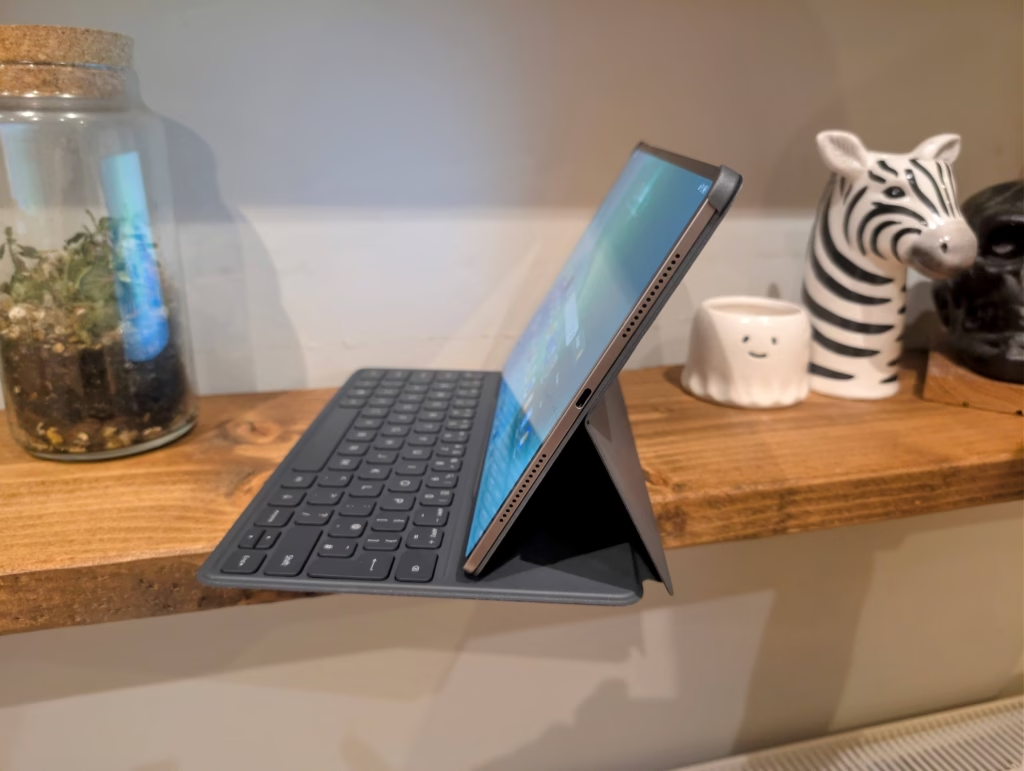
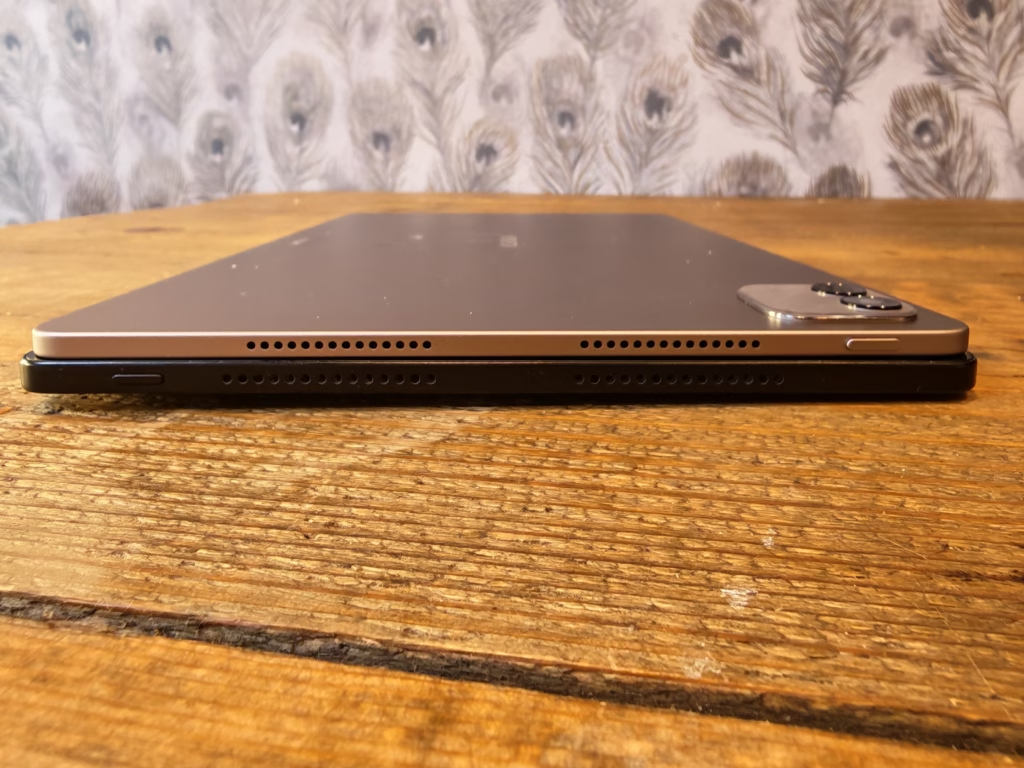
The headline figure for the MagicPad4 is its 4.8 mm thickness, which Honor claims makes it the thinnest tablet currently on the market. For context, the iPad Pro sits at 5.1 mm, the Samsung Galaxy Tab S11 is around 5.5 mm, and the previous MagicPad3 measured 5.8 mm. Combined with a weight of just 450 g, the MagicPad4 is noticeably lighter and thinner than its predecessor.
In hand, the difference compared to the MagicPad2 (which was 555 g) is immediately apparent. It feels remarkably light for a 12.3″ tablet, and you can comfortably hold it in one hand for extended reading sessions without fatigue. Honor has achieved this partly through what it calls a “Crescent Structure” design and the use of aerospace-grade special fibre material, which the company says reduces weight by 32% while increasing stiffness by 30%. Whatever the engineering behind it, the result is a tablet that feels premium and solid despite its featherweight construction.
The tablet is available in Grey and White, which keeps things simple and professional. The back panel has a clean, understated look with a small camera module in the corner. There is no IP rating for water or dust resistance, but as I noted in my MagicPad2 review, this is common across most tablets. Samsung is one of the few manufacturers offering IP68 on its Galaxy Tab range, and you pay a premium for that.
One notable improvement from the MagicPad2 is the switch to USB Type-C 3.2, which also supports DisplayPort 1.2. This allows you to connect an external monitor to the tablet, which has the potential for significant productivity improvements. The MagicPad2 was limited to USB-C 2.0, so this is a welcome upgrade that opens up the tablet to a much broader range of use cases.
When paired with the keyboard and stylus, the complete mobile office setup weighs approximately 852 g. That is considerably lighter than a 13″ MacBook Air at 1,240 g, and even lighter than many ultrabooks. For someone like me who occasionally travels for work, the idea of leaving the laptop behind and carrying just this setup is genuinely appealing.
Display
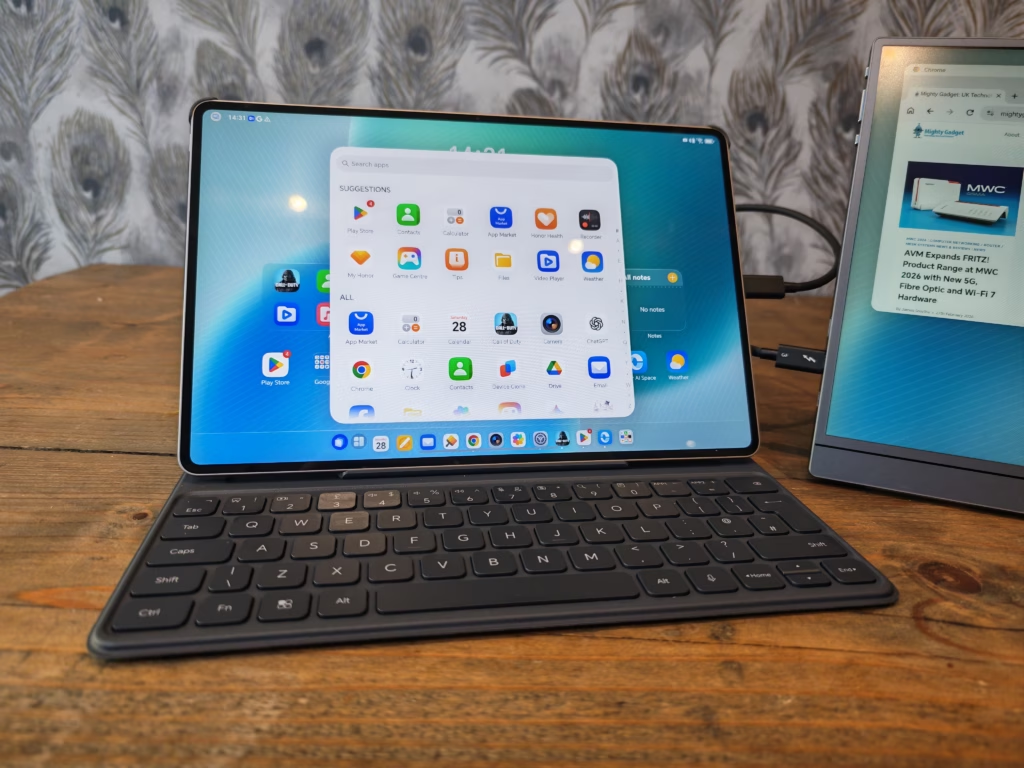
The MagicPad4 returns to a 12.3″ OLED panel after the MagicPad3’s move to a 13.3″ IPS LCD. This is, in my opinion, the right call. The MagicPad3’s decision to swap OLED for a larger IPS screen was met with some disappointment, and the MagicPad4 corrects course.
The 12.3″ OLED display runs at a 3000 x 1920 resolution with a pixel density of approximately 290 ppi. That is sharp enough that individual pixels are invisible at normal viewing distances. The screen-to-body ratio is 93%, achieved through ultra-narrow 4 mm bezels, which gives the tablet a very modern, immersive feel. By comparison, the iPad Pro 13 has an 89% screen-to-body ratio with 7.6 mm bezels, so Honor has done well here.
The refresh rate has been bumped to 165 Hz, up from 144 Hz on the MagicPad2. In practice, the difference between 144 Hz and 165 Hz is subtle, but it does contribute to the overall smoothness of the interface, and games that support the higher refresh rate will benefit. It is worth noting that not all apps will take advantage of this, and the system will dynamically adjust the refresh rate to save battery.
Peak HDR brightness is rated at 2,400 nits, which is a significant step up from the MagicPad2’s 1,600 nits. In practice, this makes a noticeable difference when watching HDR content or using the tablet outdoors in bright sunlight. The screen remains legible and punchy in conditions that would have washed out the MagicPad2.
Honor has also included a comprehensive suite of eye comfort technologies. The display features 5,280 Hz PWM dimming at the maximum refresh rate, which is among the highest I have seen on a tablet. This reduces the flickering effect that can cause eye strain at low brightness levels. There is also a chip-level AI defocus display feature and what Honor calls DOT Eye Comfort Technology. The display carries TUV Rheinland certification for both low blue light and flicker-free operation. As someone who spends far too much time staring at screens, I appreciate that Honor continues to invest in eye comfort features, and the high PWM dimming frequency is particularly welcome.
Keyboard
The Honor MagicPad4 can be paired with the new Honor MagicPad4 Smart Keyboard, and if you are buying from the Honor UK store at launch, this is included as a free gift along with the Magic-Pencil 3 (the two accessories are worth a combined £170).
The keyboard attaches magnetically to the tablet, much like the MagicPad2’s keyboard did. It provides a stable typing surface and the keys have a reasonable amount of travel for an accessory this thin. Key layout is sensible and there are no awkward compromises with key sizing. It is perfectly usable for writing emails, taking meeting notes, or drafting documents on the go.
For me, this remains one of the strongest reasons to choose a tablet like the MagicPad4 over a basic media consumption device. With the keyboard attached, it transforms into a lightweight productivity tool that I have used happily on train journeys and during work trips. I am not going to ditch my laptop for serious work, but for travelling light and getting basic tasks done, it is an excellent solution.
One thing to bear in mind is that if you miss the launch promotion, the keyboard is a separate purchase. This adds to the overall cost, and it is frustrating that tablet manufacturers continue to sell essential accessories separately at a premium. That said, Honor’s launch bundles have historically been quite generous, so it is worth timing your purchase carefully.
Stylus
The Honor Magic-Pencil 3 is the stylus option for the MagicPad4. It features a matte texture with a skin-friendly coating for a comfortable grip, and uses a three-electrode tip for precise input. It attaches magnetically to the top bezel of the tablet and charges wirelessly when docked.
The writing and drawing experience is smooth and responsive. Latency is low enough that it feels natural for note-taking, and the pressure sensitivity is adequate for sketching and basic illustration work. Honor Notes, the built-in note-taking app, includes AI-powered features such as formula recognition and geometric shape improvement, which could be useful for students.
My only real criticism of the stylus design, and this was the same issue with the MagicPad2, is that the magnetic attachment is not strong enough to prevent the pencil from being knocked off if you carry the tablet in a bag. You will want to be careful not to lose it, or invest in a case that secures the stylus more firmly. This is not unique to Honor, as Apple Pencil users will be familiar with the same problem, but it remains annoying.
Performance and Benchmarks
I was sent a pre-release review sample, and frustratingly, it seems that Honor has blocked most benchmarking apps, so I am unable to review the performance properly.
Benchmarks don’t really show what real-world performance is like, and the fact that this has the Snapdragon 8 Gen 5 means you are unlikely to have any performance issues, certainly not compared to other Android tablets.
The Snapdragon 8 Gen 5 is built on TSMC’s 3 nm process and is the first time this chipset has appeared in a tablet. It should deliver a meaningful uplift in both performance and power efficiency compared to the Snapdragon 8 Gen 3 in the MagicPad3 and the Snapdragon 8s Gen 3 in the MagicPad2. The 3 nm process in particular should help with thermals and battery life, as the chip can do the same work while drawing less power.
I was able to install some games, though. My go-to options are normally Call of Duty and Genshin Impact. Both ran smoothly at high settings, and the MagicPad4’s 165 Hz display meant that games which support higher frame rates felt noticeably fluid. The tablet remained comfortable to hold during extended gaming sessions, which suggests the 13-layer Ice Cooling System with its 81,717 mm2 of heat dissipation area is doing its job.
The MagicPad4 comes in two configurations: 12 GB RAM with 256 GB storage, and 16 GB RAM with 512 GB storage. There is no microSD card slot for storage expansion, which is a limitation if you plan to store large media libraries locally. For general use including multitasking, media consumption, and light productivity, 12 GB of RAM is more than sufficient. The 16 GB option is worth considering if you plan to use the tablet heavily for gaming or multitasking with demanding apps.
It is disappointing that I cannot provide benchmark figures for this review. I would have liked to compare directly against the MagicPad2 and the OnePlus Pad 3, but Honor’s decision to block benchmarking apps on pre-release firmware made this impossible. I will update this review with proper benchmark data if Honor releases updated firmware that removes these restrictions.
Speakers
The MagicPad4 retains the eight-speaker setup from its predecessors, and the audio quality continues to be a strong point for the MagicPad series. The speakers produce clear, well-separated sound with decent bass for a tablet. Honor has included Spatial Audio support with DTS X:Ultra certification, and in practice this translates to a wider soundstage than you would expect from a device this thin.
I watched several films and listened to a range of music genres, and the results were consistently impressive. Dialogue is clear, action sequences have good presence, and there is enough volume to fill a small room comfortably. Switching between different content types, from a podcast to an action film to a live concert recording, the speakers handled everything well, with precise separation and reasonable depth.
At the highest volume levels, there is some distortion, particularly with bass-heavy tracks. This was also an issue on the MagicPad2, and it is a common limitation of tablet speakers. For most listening at moderate volumes, however, the audio performance is among the best you will find on any Android tablet at this price point.
Camera
The MagicPad4 has a 13 MP rear camera and a 9 MP front-facing camera. The MagicPad2 had a slight edge here with its additional 2 MP macro lens, which has been dropped for this generation.
As with most tablets, the cameras are adequate rather than impressive. The rear camera performs reasonably well in good lighting, producing clear and detailed images. In low light, noise becomes more apparent and detail drops off noticeably. The front camera is fine for video calls, which is realistically the main camera use case for a tablet.
I would not buy any tablet based on its camera performance, and the MagicPad4 is no exception. If you need decent photos, use your phone. For scanning documents, quick snaps, and video conferencing, the cameras here do the job adequately.
Android 16 and MagicOS 10
The MagicPad4 ships with Android 16 and MagicOS 10, which is Honor’s latest custom interface. Honor has committed to six years of OS and security patch updates, which is reassuring for a tablet purchase and brings it in line with what Samsung and Google offer.
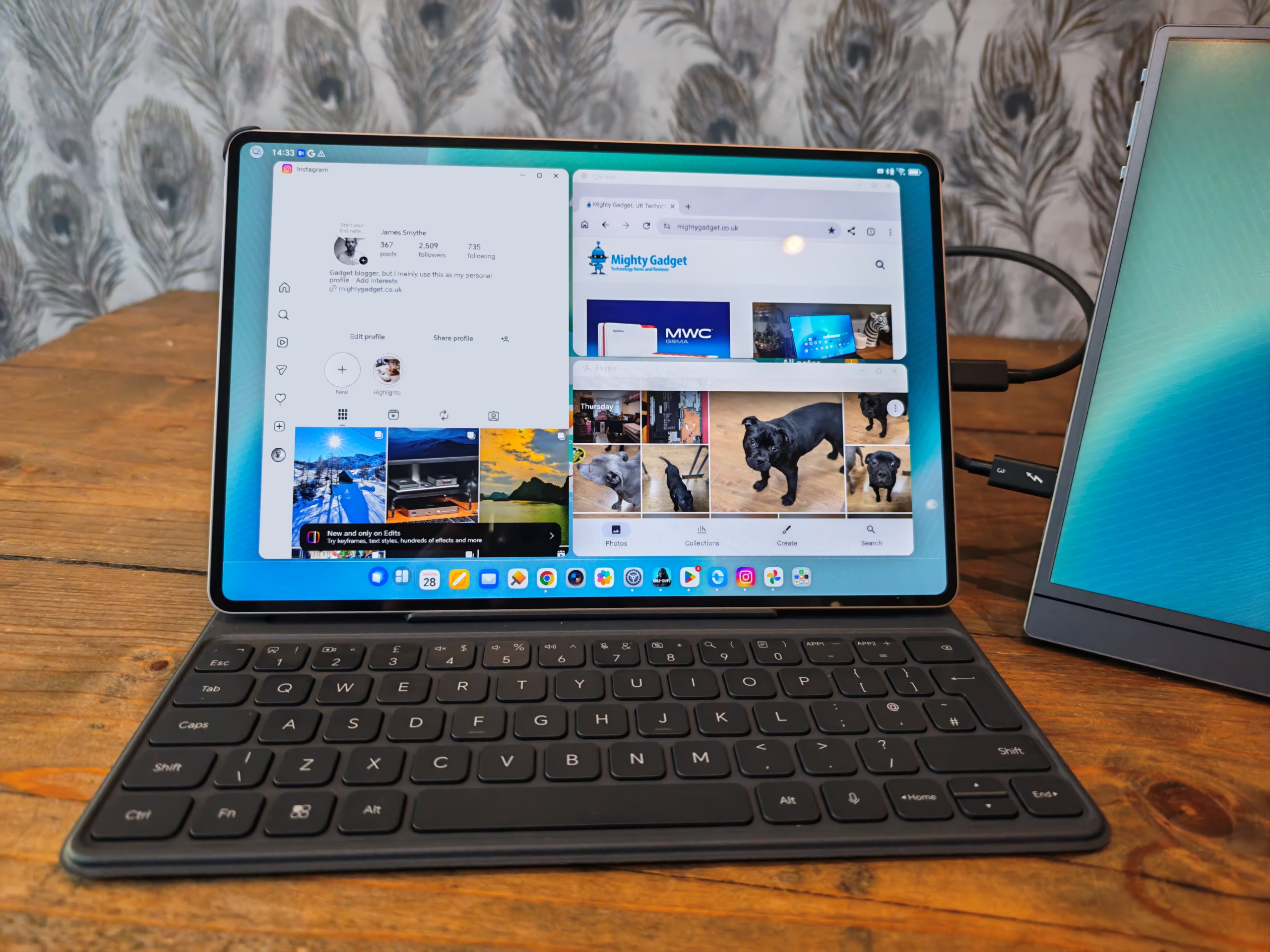
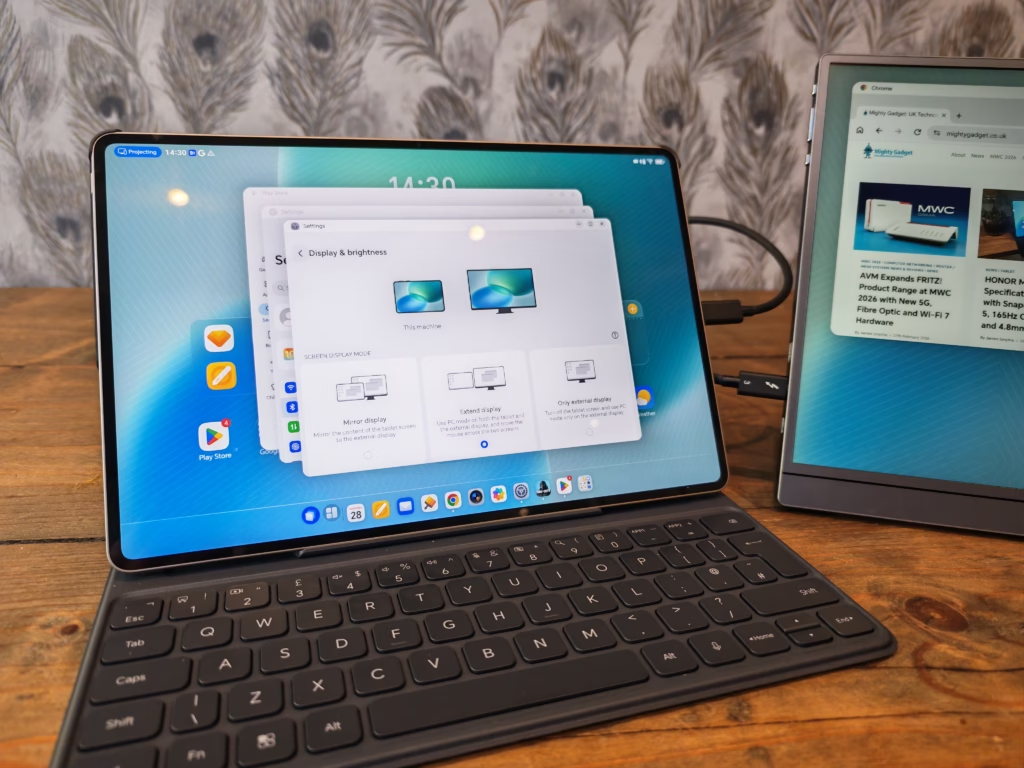
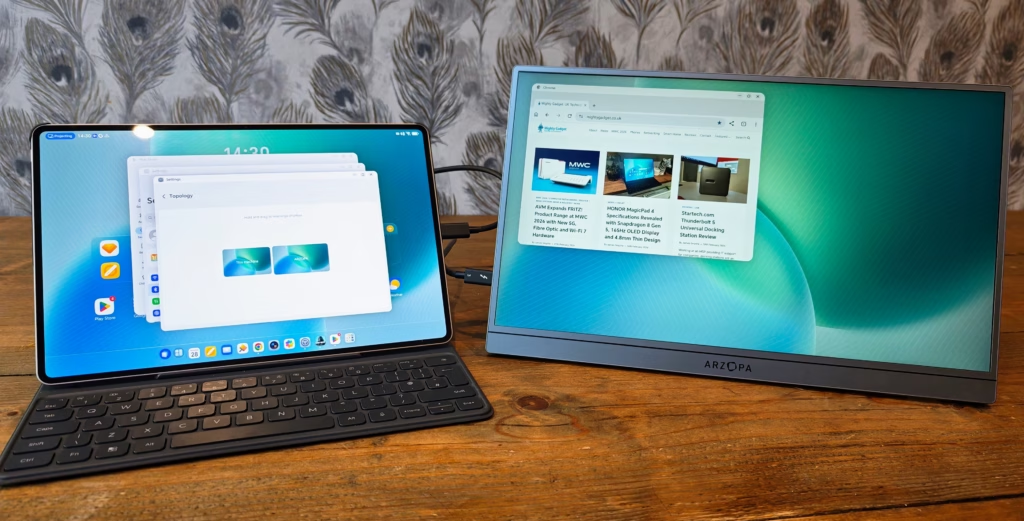
One interesting feature of MagicOS 10 with this tablet is the ability to enable PC mode, which switches the interface to use floating windows, allowing you to multitask. It then supports keyboard and mouse input with various keyboard shortcuts. Combining this with the monitor support lets you turn it into a PC-like workstation. For someone like me, this could be perfect when travelling, allowing me to take just this tablet on work trips rather than a much larger and heavier laptop.
The experience was not perfect, though. Plugging the tablet into a docking station, it connected to my 5120 x 1440 Samsung C49RG9 and displayed the desktop at full resolution, but it wouldn’t recognise the keyboard and mouse. Plugging the MagicPad2 in, I was unable to extend the monitor (as expected), but it did recognise the keyboard and mouse.
Additionally, I tested plugging a portable monitor in directly, and the tablet was able to provide enough power for this and support the extended display. So, this has huge potential for a highly portable work setup.
Hopefully, this will get fixed in the future, or a simple solution would be to pair a Bluetooth keyboard and mouse.
MagicOS 10 also includes a range of AI features. Honor AI Memo acts as an intelligent meeting assistant, using AI to identify speakers and key topics, and it can automatically generate meeting minutes. There is also an AI Summary feature that can condense lengthy articles and documents, and AI Writing Tools for drafting and editing text. These are useful additions for productivity-focused users, though the quality of AI-generated meeting minutes and summaries can vary depending on the complexity of the source material.
Honor Connect allows the MagicPad4 to connect seamlessly with other devices, including iPhone, iPad, and Mac. The tablet can function as an extended screen for macOS devices, which is a genuinely useful feature if you work across platforms. Honor OneTap enables quick file transfers between Honor devices with a simple tap. I have personally grown to like MagicOS. It is a heavily modified UI, and other brands like Samsung may offer a slightly more polished UI, but I’d regard MagicOS as one of the better implementations of Android on a tablet.
Connectivity
The MagicPad4 supports Wi-Fi 7 with a four-antenna design, which is a significant upgrade over the MagicPad2’s Wi-Fi 6. Honor claims a maximum network coverage distance of 700 m, which is optimistic but does indicate that the antenna system is well designed. In practice, Wi-Fi performance was excellent around my home, with strong signal strength even in rooms that can be problematic with some devices.
Bluetooth 6 is included, which is another upgrade from the MagicPad2’s Bluetooth 5.3. This should deliver improved range, lower latency, and better audio quality with supported accessories.
As with the MagicPad2, there is no cellular connectivity option. You will need to rely on Wi-Fi or tether to your phone when out and about. This is standard for most Android tablets at this price point, and while Samsung and Apple offer 5G variants, these always come at a significant additional cost.
Battery Life and Charging
The MagicPad4 packs a 10,100 mAh battery into its 4.8 mm frame, which is a remarkable achievement given how thin the device is. The capacity is nearly identical to the MagicPad2’s 10,050 mAh cell, though the MagicPad3 had a larger 12,450 mAh battery in its thicker chassis.
In day-to-day use with a mix of web browsing, media consumption, note-taking, and occasional gaming, the battery comfortably lasted through a full day of heavy use. With more moderate usage patterns, I found myself charging every two to three days, which is similar to my experience with the MagicPad2. The move to the more power-efficient 3 nm Snapdragon 8 Gen 5 should, in theory, help offset any impact from the slightly brighter display and higher refresh rate.
Charging is handled by 66 W Honor SuperCharge over USB-C, which is the same speed Honor has used across its recent tablets. It tops up the large battery in a reasonable amount of time, and there is also 5 W reverse wired charging if you need to give your phone an emergency top-up. There is no wireless charging, but this is expected for a tablet, and the 4.8 mm thickness would make implementing a charging coil extremely difficult.
Price and Alternative Options
At the time of writing, Honor had not confirmed the UK RRP for the MagicPad4. The product page was live on the Honor UK store, and this indicated you could get up to £200 off with early bird vouchers if you register your interest. There are also launch gifts of the Honor Magic-Pencil 3 and the MagicPad4 Smart Keyboard, worth a combined £170, on a first-come, first-served basis.
For reference, the MagicPad3 had an RRP of £600, and the MagicPad2 was £500. The European price is expected to be around €700, which would put the UK RRP somewhere in the £600-£650 range if it follows the same pattern as the MagicPad3. Both previous models had attractive early bird launch discounts, and Honor regularly runs promotions throughout the year.
The OnePlus Pad 3 is again likely the best alternative. This was launched in the middle of 2025. It has a larger 13.2″ IPS display with a higher resolution, but much lower brightness and a slightly lower 144 Hz refresh rate. This uses the Snapdragon 8 Elite, which is an older chipset; this will have higher raw performance but is less efficient than the 3 nm Snapdragon 8 Gen 5. The OnePlus Pad 3 has an RRP of £529 for the 12 GB / 256 GB model and £599 for the 16 GB / 512 GB variant. It is regularly available with accessories bundled in. The OnePlus Pad 3 is heavier at 675 g and thicker at 5.97 mm, but it does have a larger 12,140 mAh battery with faster 80 W charging. The choice between the two comes down to whether you prioritise the MagicPad4’s OLED display, thinner design, and newer chipset, or the OnePlus Pad 3’s larger screen, bigger battery, and more established pricing.
For Samsung, you either have the much more expensive Galaxy Tab S11, which starts at £800, or the Galaxy Tab S10 FE+ at £519, which was launched almost a year ago and has generally inferior specs. The Galaxy Tab S11 is a superb tablet, but it sits in a different price bracket entirely. Samsung does offer the advantage of IP68 water resistance and a well-established ecosystem, but you pay handsomely for those benefits.
Google appears to have given up on tablets, so the Pixel Tablet is no longer a relevant competitor. Apple’s iPad Air 11″ starts at around £600 but runs iPadOS rather than Android, so it is only a direct comparison if you are platform-agnostic.
Overall
If you are looking for a new tablet in 2026, the Honor MagicPad4 is a great choice. The 4.8 mm thin design and 450 g weight are genuinely impressive, and the return to a 12.3″ OLED display after the MagicPad3’s IPS detour is welcome. The Snapdragon 8 Gen 5 on a 3 nm process brings improved efficiency, Wi-Fi 7 and Bluetooth 6 bring modern connectivity, and the USB Type-C 3.2 port with DisplayPort output adds real productivity value.
While the hardware has barely been upgraded in two years when compared to the MagicPad2, the main benefits seem to be improvements with the OS and improved productivity enabled by the USB Type-C 3.2 port. The PC mode with external monitor support, combined with the keyboard and stylus accessories, makes a strong case for this as a lightweight laptop alternative for basic work tasks and travel.
There are some frustrations. I was unable to run proper benchmarks due to pre-release software restrictions, and the docking station keyboard/mouse recognition issue needs to be resolved. The lack of confirmed UK pricing at the time of writing makes it difficult to give a definitive value assessment. If the MagicPad4 comes in at a similar price to the MagicPad3’s £600 RRP, it will face stiff competition from the OnePlus Pad 3 which undercuts it on price while offering competitive specifications. However, if Honor’s early bird discounts are as generous as they have been in the past, the MagicPad4 could represent excellent value.
The MagicPad series has consistently delivered some of the best Android tablets available, and the MagicPad4 continues that trend. It is a refined, well-built device with an excellent display, strong audio, and enough performance for anything you are likely to throw at it. If you already own a MagicPad2, the upgrade is modest unless you particularly need the DisplayPort output or Wi-Fi 7. For anyone buying fresh, it is one of the best Android tablets on the market in 2026.
Honor MagicPad4 Review
Summary
The Honor MagicPad4 refines an already strong formula, bringing back the excellent 12.3 inch OLED display while slimming the chassis down to an impressively thin and light design. Performance from the Snapdragon 8 Gen 5 feels effortless in daily use, connectivity is thoroughly modern with Wi-Fi 7 and USB-C 3.2 with DisplayPort, and the optional keyboard and stylus make it a credible lightweight productivity companion. However, this is a largely iterative upgrade over the MagicPad2, benchmark restrictions are frustrating, and final value will depend heavily on UK pricing and launch offers. For new buyers it stands out as one of the best Android tablets available in 2026, but existing MagicPad2 owners have less reason to upgrad
Overall
85%-
Overall - 85%85%
Pros
- Excellent OLED display
- Extremely thin and light
- Strong performance and efficiency
- USB-C with DisplayPort
Cons
- Limited generational upgrade
- No cellular option

I am James, a UK-based tech enthusiast and the Editor and Owner of Mighty Gadget, which I’ve proudly run since 2007. Passionate about all things technology, my expertise spans from computers and networking to mobile, wearables, and smart home devices.
As a fitness fanatic who loves running and cycling, I also have a keen interest in fitness-related technology, and I take every opportunity to cover this niche on my blog. My diverse interests allow me to bring a unique perspective to tech blogging, merging lifestyle, fitness, and the latest tech trends.
I’m proud to share that Vuelio has consistently ranked Mighty Gadget as one of the top technology blogs in the UK. With my dedication to technology and drive to share my insights, I aim to continue providing my readers with engaging and informative content.